Production Update 1.3.8 - Kiosk machines, operators, and settlements
Summary
Admin has a new Kiosk Machines section. It lists every physical kiosk, whether it is online, and the money players moved on it. A kiosk can be given to an operator, and an operator can be linked to a Shop. A kiosk of a Shop signs in that Shop's players only. Money is split when a kiosk's code, name, or operator changes. Staff record commission in settlements. The Kiosk setup screen on a kiosk now asks for the emergency code, and Admin can show that code.
Added
- Admin → Kiosk Machines lists every physical kiosk: its Kiosk ID, code, name, operator, whether it is online, and its money in, money out, and net profit for Today, 7 days, 30 days, or a custom period. The list can be searched, filtered, sorted, and exported.Module: Kiosk machines · Portal: Admin
- Devices & setup codes shows machines that run the kiosk app but are not registered. Admin creates a one-time setup code. Staff type it on the kiosk with a Kiosk Code and a name. The code works once, for 30 minutes.Module: Kiosk machines · Portal: Admin
- A kiosk has its own page: totals and a daily chart, and tabs for Transactions, History, Periods, Devices, Settlements, and Settings. Periods splits the money at every change of code, name, or operator.Module: Kiosk machines · Portal: Admin
- Operators are the Shops, people, and companies that run kiosks. An operator of type Shop is linked to one Shop. A kiosk is given to an operator from a date and time, with a reason. A reference rate can be set for each kiosk.Module: Kiosk operators · Portal: Admin
- Settlements are commission statements for one operator and one period. The system shows the numbers for each kiosk. Staff type the amount, approve it, pay by hand, and mark it as paid. Lines and transactions can be exported as CSV.Module: Kiosk settlements · Portal: Admin
- Emergency code shows the 6-digit code a technician types on a kiosk. It changes every 10 minutes. It stays hidden until Show code is selected, and each time it is shown is recorded in the audit log.Module: Kiosk emergency code · Portal: Admin
Changed
- A kiosk whose operator is linked to a Shop signs in that Shop's players only. A player of another Shop is refused, and the message names the kiosk's Shop. A player with no Shop yet signs in and joins that Shop. Signing in on the website is not affected.Module: Sign-in · Portal: Player
- The Kiosk setup screen on a kiosk now says Staff only. Staff type the emergency code first, then the setup code. Five wrong codes lock the screen on that kiosk for 5 minutes.Module: Kiosk machines · Portal: Player
- A payment made on a kiosk is linked to that kiosk. The Transactions tab shows the code the kiosk had when the money moved.Module: Kiosk machines · Portal: Admin
Security
- Three new permissions in Role & Permission Management. Kiosk Machine Management and Kiosk settlements are on by default for Finance Admin and Operation Admin. Kiosk emergency code is on by default for Operation Admin. System Admin and Super Admin can open everything.Module: Roles and permissions · Portal: Admin
Required Actions
- Register each kiosk. Create a setup code in Devices & setup codes, then enter it on the kiosk with a Kiosk Code and a name.Portal: Admin
- For each Shop that runs kiosks, create an operator of type Shop with the Shop as Linked shop. Then give the Shop's kiosks to that operator from the kiosk's Settings tab.Portal: Admin
- Give Kiosk emergency code only to staff who support technicians. The code opens the staff screens of every kiosk.Portal: Admin
- Tell Shop staff that a kiosk linked to a Shop accepts that Shop's players only. A player of another Shop sees a message with the Shop's name.Portal: Shop
Affected Modules
- Kiosk machines
- Kiosk operators
- Kiosk settlements
- Kiosk emergency code
- Sign-in
- Roles and permissions
Affected Portals
- Admin Portal
- Player Portal
This release adds Kiosk Machines to the Admin portal. Admin can see every physical kiosk, link it to a Shop, read the money players moved on it, and record the commission paid for it.
Balances, deposits, withdrawals, and games work the same way. Sign-in changes in one case: on a kiosk that belongs to a Shop.
Who: Admin staff with the new kiosk permissions. Technicians and Shop staff who set up a kiosk. Players who sign in on a kiosk that belongs to a Shop.
The step-by-step guide, with a picture for each step, is Admin: Kiosk Machines.
Kiosk Machines in Admin
The new menu group has five pages.
| Page | What it is for |
|---|---|
| Kiosk machines | Every kiosk, its status, its operator, and its money for the period |
| Devices & setup codes | Machines that are not registered yet, and the codes that register them |
| Operators | The Shops, people, and companies that run kiosks |
| Settlements | Commission statements for an operator and a period |
| Emergency code | The 6-digit code a technician types on a kiosk |
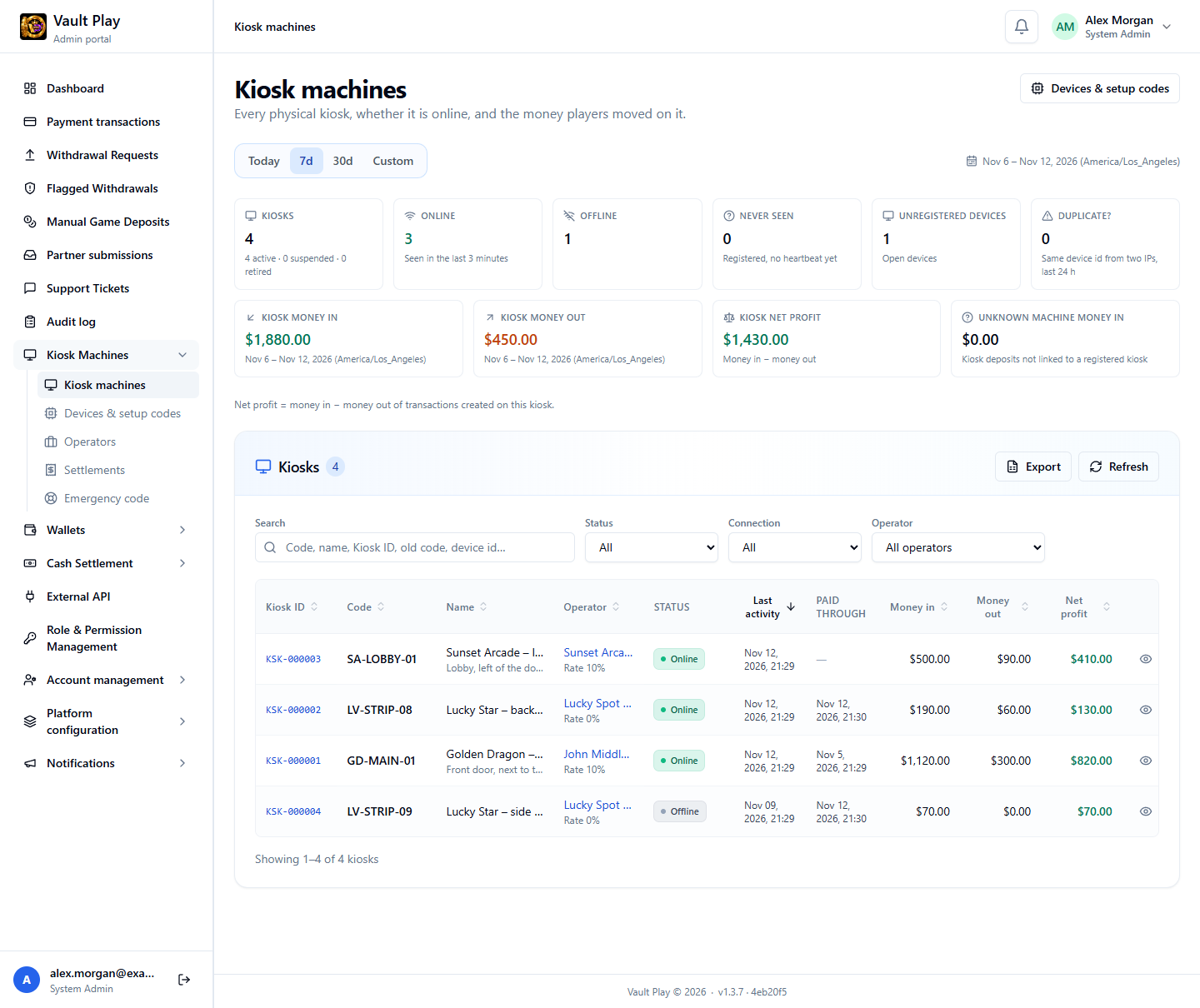
The cards on top count kiosks that are online, offline, or never seen, and machines that are not registered yet. Money in is completed deposits made on kiosks. Money out is completed withdrawals. Net profit is money in minus money out.
A kiosk has three names. The Kiosk ID, like KSK-000001, never changes. The Kiosk Code and the Name are chosen by staff and can change.
Register a kiosk
A machine with the kiosk app appears under Devices & setup codes → Unregistered by itself. To make it a kiosk:
- In Admin, select Create setup code. The code is shown one time. It works once, for 30 minutes.
- On the kiosk, open Kiosk setup. Type the emergency code on the Staff only screen.
- Type the setup code, a Kiosk Code, and a name. Select Register this kiosk.
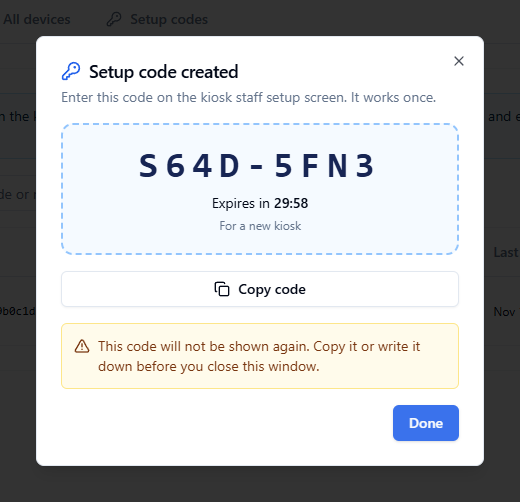
The same kind of code, created from a kiosk's Settings tab, moves a kiosk to a new machine. The kiosk keeps its ID, its history, and its money.
Link a kiosk to a Shop
A kiosk is linked to a Shop through its operator.
- Operators → New operator. Set Type to Shop and pick the Shop in Linked shop. A Shop can be linked to only one operator.
- Open the kiosk, then Settings → Change operator. Pick the operator, when it starts, and a reason.
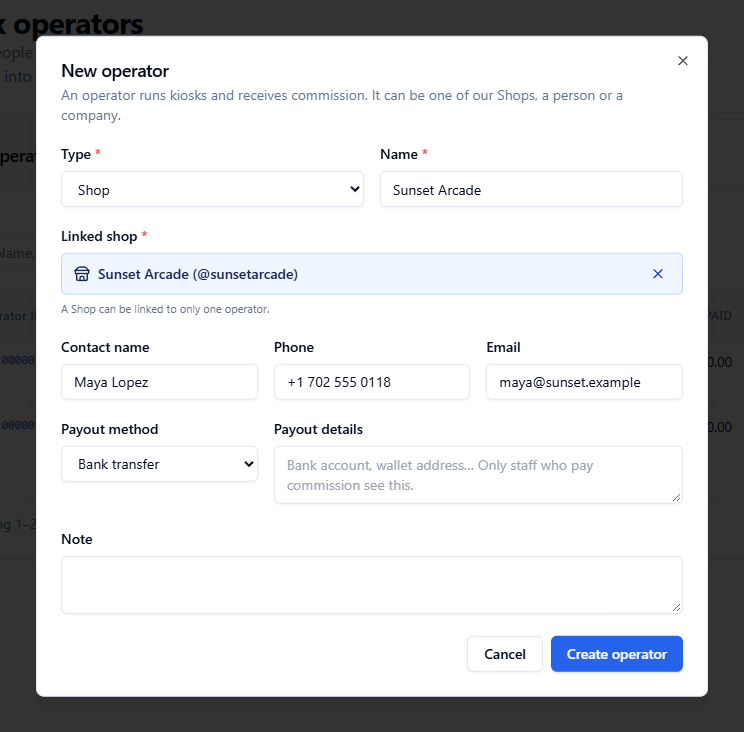
An operator can also be a person or a company. In that case Linked shop is optional.
Sign-in on a Shop's kiosk
Once a kiosk's operator has a linked Shop, the kiosk is for that Shop's players.
| Who signs in on the kiosk | What happens |
|---|---|
| A player of that Shop | Signs in as usual |
| A player of another Shop | Sign-in is refused. The message names the kiosk's Shop |
| A player with no Shop yet | Signs in, and joins that Shop |
| A new player who registers on the kiosk | Joins that Shop |
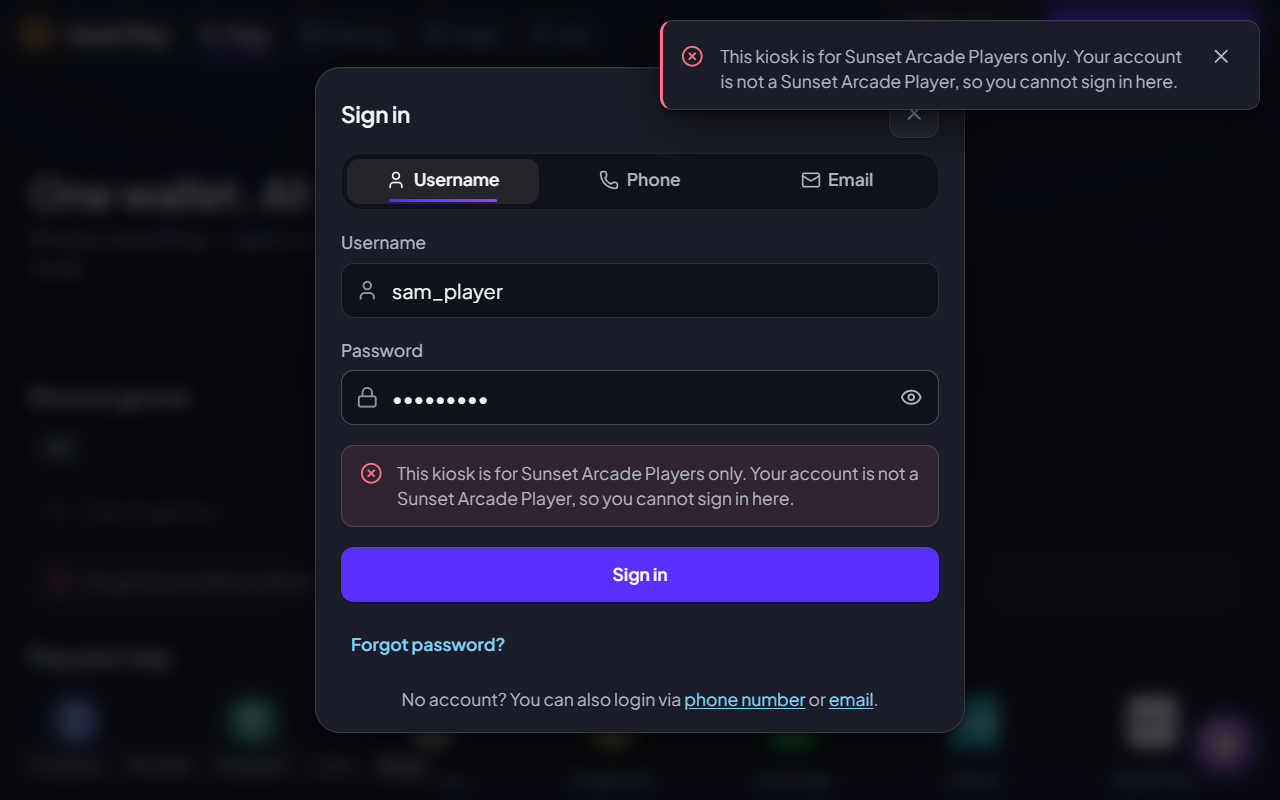
This covers sign-in by username, phone, and email. It applies on kiosks only. A kiosk with no operator, or with an operator that has no linked Shop, accepts every player.
Money before and after a change
A kiosk can be renamed, get a new code, or move to another operator. The money is not mixed.
On a kiosk's page, a yellow note appears when something changed during the period. The Periods tab has one row for each stretch between changes, with its own money in, money out, net profit, and players.
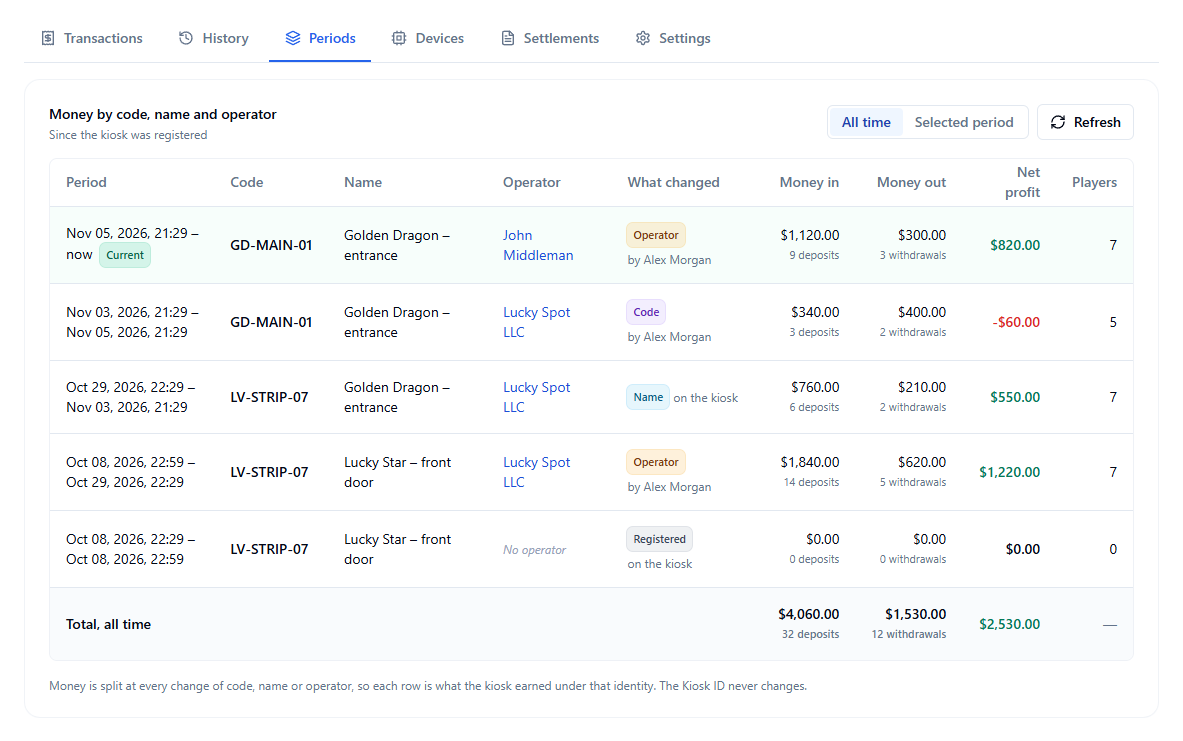
The Transactions tab shows Code at the time for each payment. History lists every change, who made it, and when.
Settlements
A settlement is a statement for one operator and one period. It does not move money.
| Step | What staff do |
|---|---|
| Preview | Pick the operator and the period. The page shows money in, money out, and net profit for each kiosk, for the time the operator had it |
| Create draft | Type an amount for every kiosk. The reference amount, net profit × reference rate, is a suggestion |
| Approve | Locks the numbers and the amounts |
| Mark as paid | Records the date, the method, and the reference of a payment made by hand |
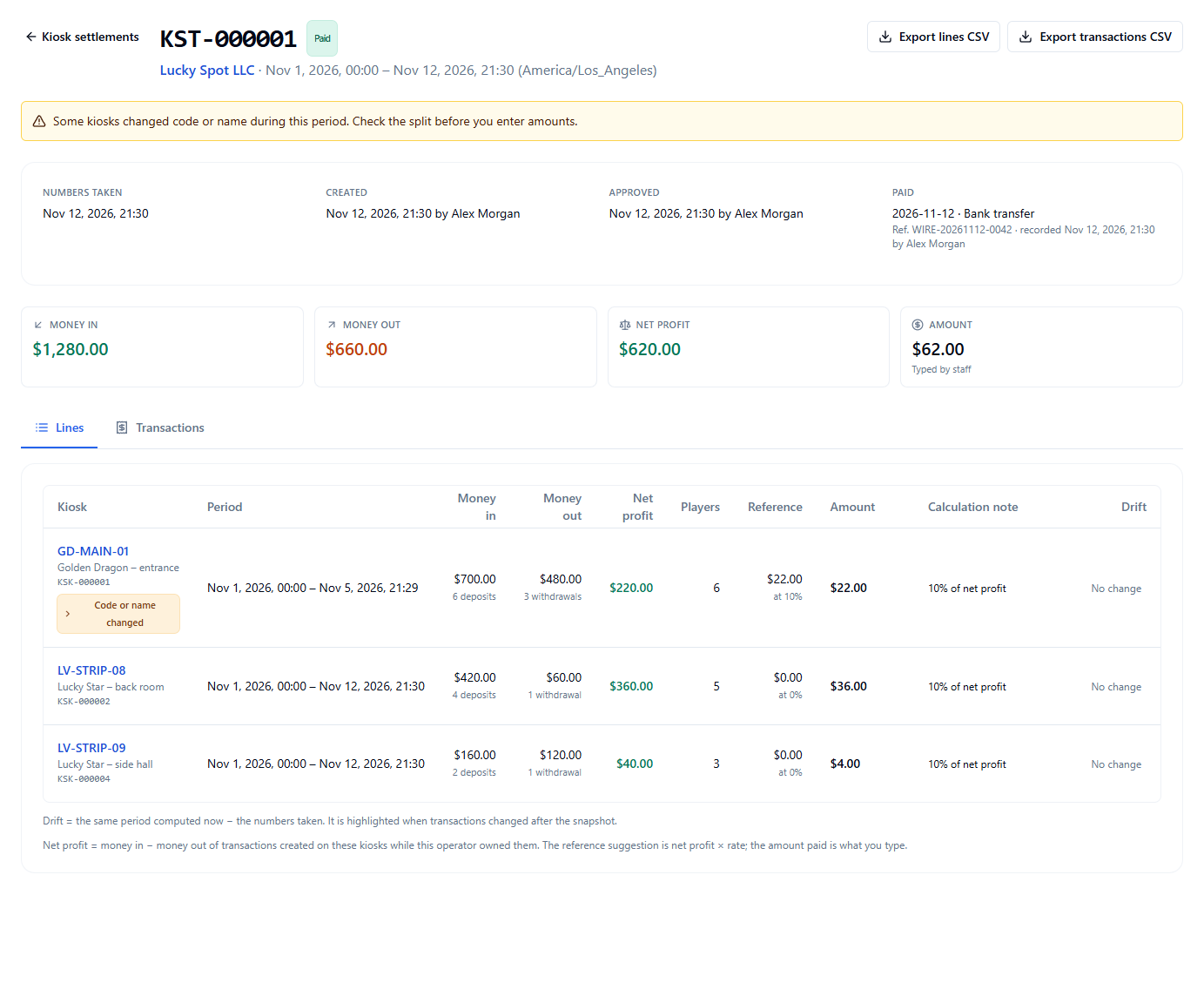
An approved settlement can be cancelled until it is marked as paid. Time that is already in another settlement cannot be settled a second time.
Emergency code
Kiosk Machines → Emergency code shows the 6-digit code a technician types on a kiosk: on the staff PIN pad in place of the staff PIN, and on the Staff only screen of Kiosk setup.
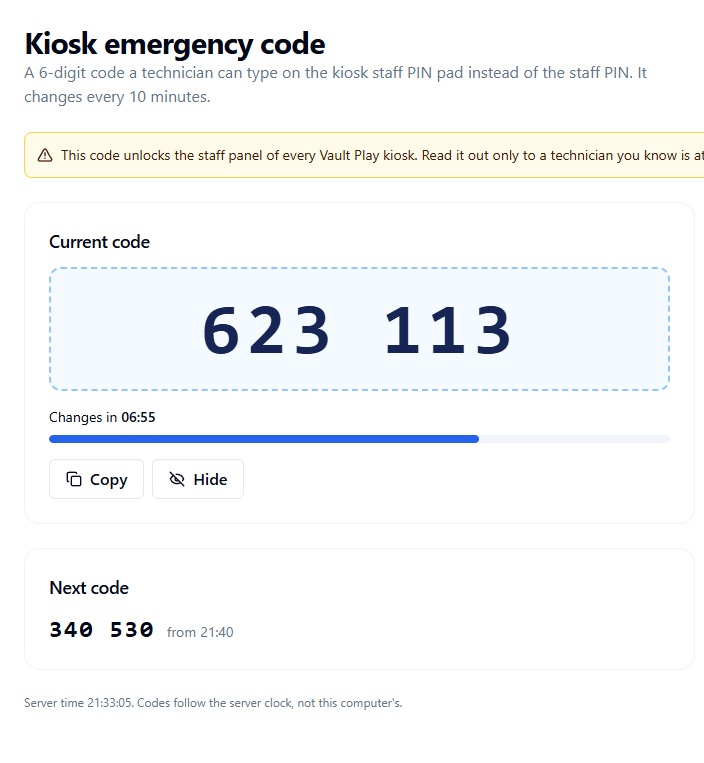
| Rule | Detail |
|---|---|
| It changes | Every 10 minutes. Close to a change, the next code works too |
| It is the same for all kiosks | The code opens the staff screens of every Vault Play kiosk |
| It is recorded | Each time a code is shown is written to the audit log |
| Wrong tries | Five wrong tries lock the screen on that kiosk for 5 minutes |
The page needs its own permission, Kiosk emergency code.
What to tell the team
Kiosks do not link themselves. Each one is registered with a setup code, then given to an operator. Until then it shows No operator and accepts every player.
A Shop's kiosk accepts that Shop's players only. If a player is refused, the message names the Shop. Check the kiosk's operator and its linked Shop before changing the player's account.
Renaming a kiosk or changing its operator does not lose money. The Kiosk ID stays the same, and Periods shows each stretch.
A settlement is a record. Pay the operator first, then select Mark as paid.
Read the emergency code out only to a technician you know is at a kiosk.