Production Update 1.3.7 - Partner replies, shop emails, and play bonus
Summary
An applicant and Admin can reply on a partner application. The conversation stays in Partner submissions. Admin's reply is also emailed, with a private link. Shop Settings says email and SMS to players are paid. A shop email to a player now shows the message in a Vault Play layout. The player list shows play bonus still held.
Added
- After Send application, the visitor opens the conversation on the partners site. The same link arrives by email and works for 30 days. They can read replies and write back. No account is required. Admin → Partner submissions shows the same messages. Reply to applicant emails that reply, with the application details and the link. Internal note stays in Admin.Module: Partner submissions · Portal: Admin, Player
Changed
- The Partner submissions list has a Message column: the latest line, and whether it was Sent or Received. Archived and Spam close the conversation. Mark as interested opens it again. Current leaves it open.Module: Partner submissions · Portal: Admin
- Shop → Settings shows Email and SMS to your Players as Paid. The cost is taken from the USD wallet when the shop sends, and the shop sees the total before sending. When a price is set, the page shows email per player, and SMS per player for each part of a long text.Module: Shop settings · Portal: Shop
- An email a shop sends its players uses a Vault Play layout. It shows the shop name, the subject, and the message the shop wrote. The footer says the player receives it because they play at that shop, with a link to unsubscribe from marketing emails.Module: Email · Portal: Shop, Player
- Admin → Players has a Play bonus column. It is the deposit bonus still held in play. The player can cash out or redeem only the balance above it. It clears when money in all is under $2.00. A figure that cannot be read shows a dash.Module: Players · Portal: Admin
Required Actions
- Reply to an applicant from Partner submissions. That reply is emailed. Use Internal note for anything the applicant should not see. If the send says the email could not be sent, the reply is still on the submission.Portal: Admin
- Tell an applicant to use the link in the email, We received your partner application, or in a later reply. The link lasts 30 days. After that, the page asks them to apply again.Portal: Player
- Tell shop staff that email and SMS to players are paid from the USD wallet. Players should now see the shop's message in the email, under the shop's name.Portal: Shop
Affected Modules
- Partner submissions
- Partners
- Shop settings
- Players
Affected Portals
- Admin Portal
- Shop Portal
- Player Portal
This release opens a reply thread on a partner application, tells shops that email and SMS to players are paid, and puts the shop's message into the email a player receives. The Admin player list shows play bonus still held.
Sign-in, balances, deposits, and cash out work the same way. The cash-out hold from version 1.3.0 and version 1.3.6 is unchanged. The new column shows that hold.
Who: a visitor who applied on the partners page. Platform staff who can open Partner submissions. A shop, on Settings and on Email and SMS. A player who receives a shop email. Admin staff, on the player list.
Reply on a partner application
Send application still stores the application under Admin → Partner submissions. The visitor is then taken to the conversation on the partners site. An email, We received your partner application, carries the same private link. The link works for 30 days. Opening it does not need an account.
On that page the visitor sees the application details, the original request, and each reply. Write a reply sends a message of up to 2,000 characters. It appears in Partner submissions. It is not a separate email to the admin team.
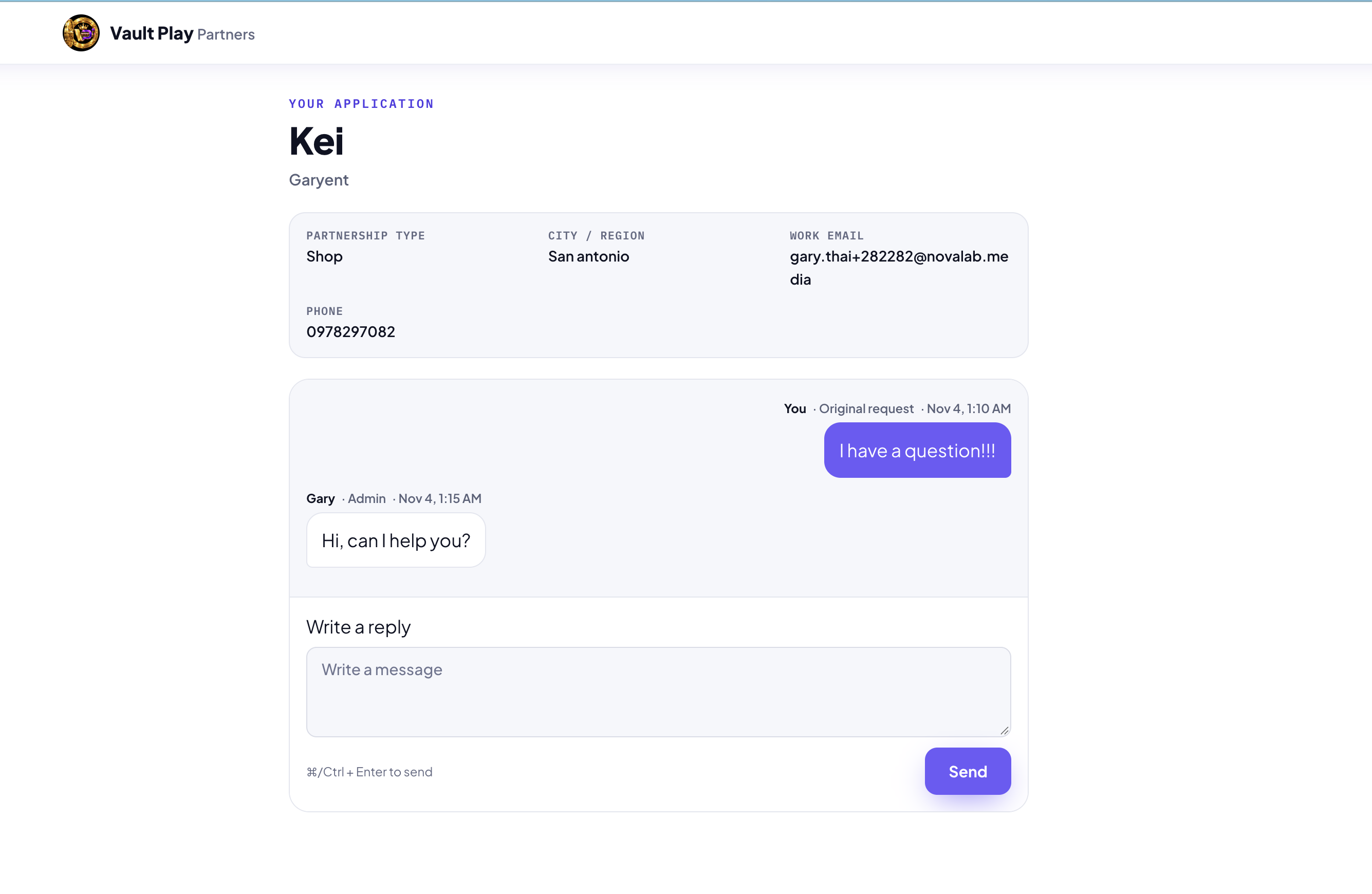
A reply from Admin is labeled with the staff member's first name and Admin. The visitor does not see who else is on the admin team, and does not see internal notes.
| What happens | Where it shows |
|---|---|
| The application | Partner submissions, and the visitor's conversation page |
| A reply from the visitor | Partner submissions. The list marks it Received |
| A reply from Admin | The conversation page, and an email, Re: Your partner application. The email quotes the reply, lists the application details, and includes Open your application thread |
| An internal note | Partner submissions only. The note says Only admins see notes |
The email to the applicant is sent as the reply is saved. If that email cannot be sent, Admin sees Reply saved, but the email could not be sent. The reply is still on the submission.
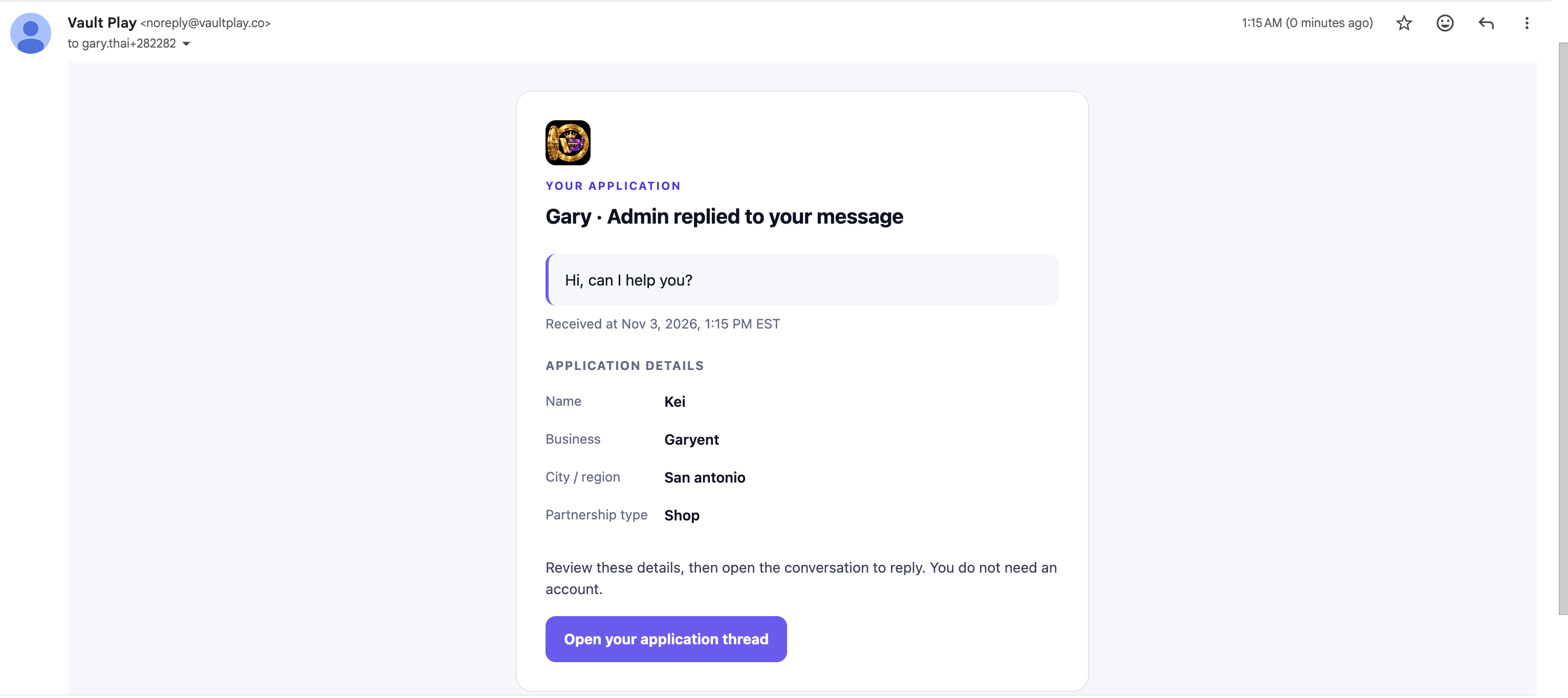
The link in the email is the way back. On the same browser, the page remembers the link for that application. A link older than 30 days says This link has expired, and asks the visitor to apply again.
Partner submissions
The people who can open Support tickets can open Partner submissions.
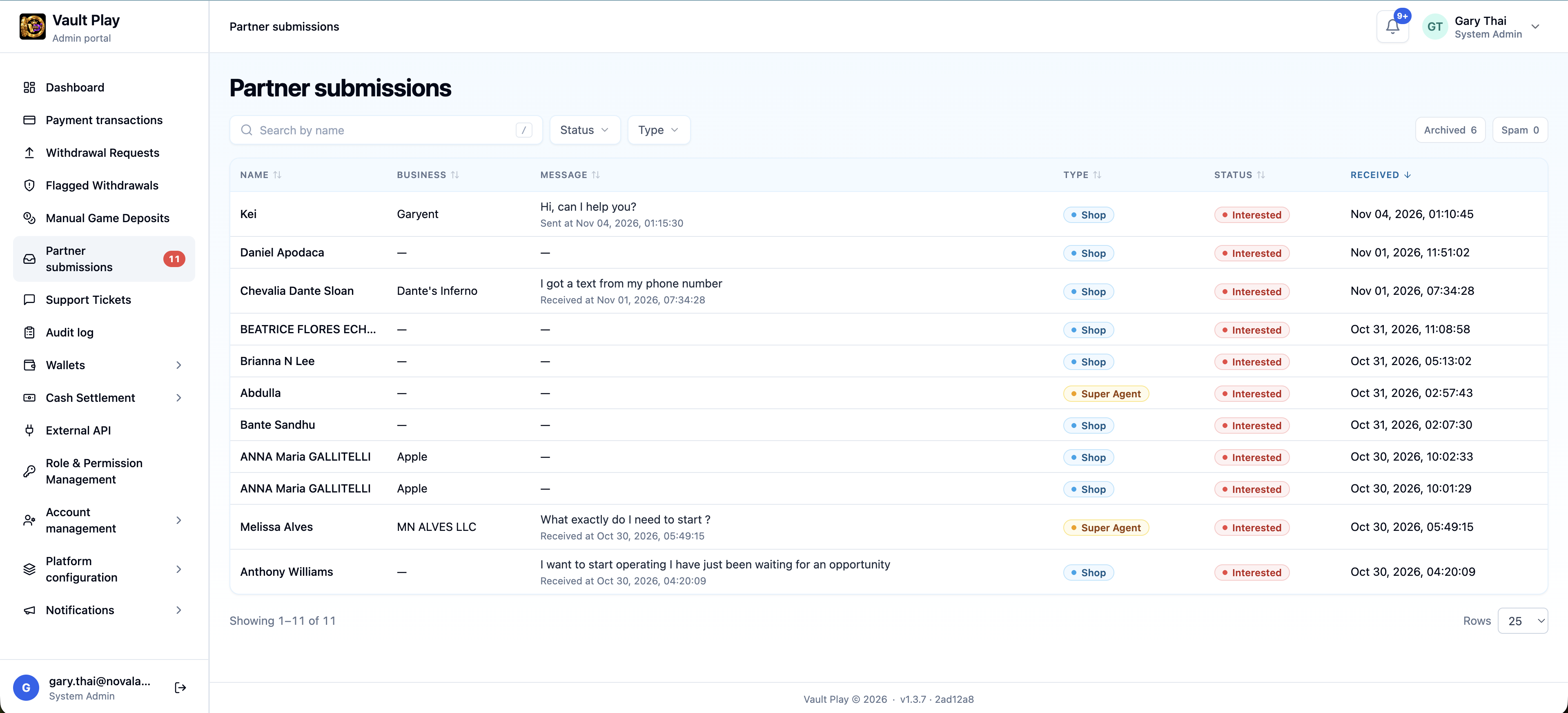
The list columns are Name, Business, Message, Type, Status, and Received. Message is the latest line, up to 120 characters. Under it, Sent means the last line was from Admin, and Received means it was the application or a reply from the visitor, with the time.
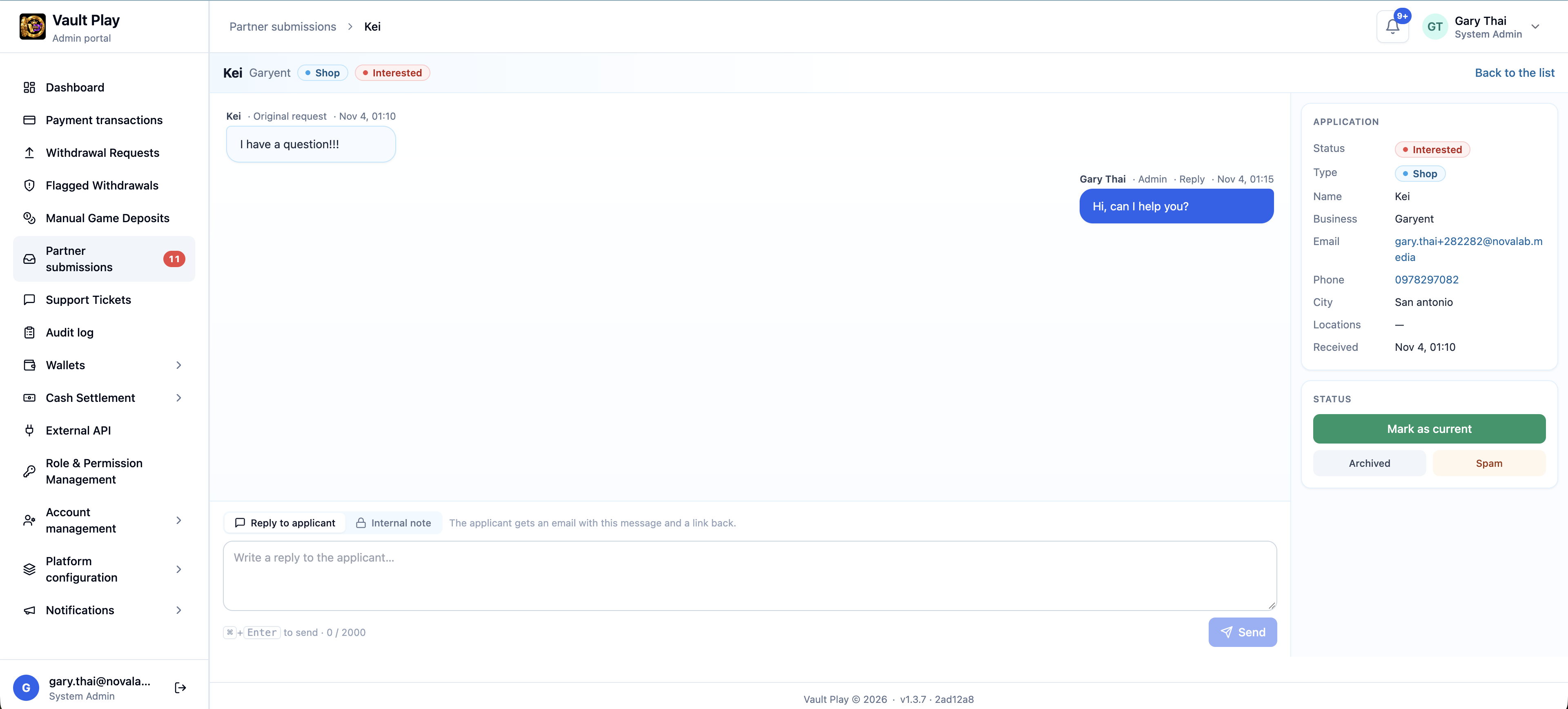
Open a row for the thread. The applicant's messages sit on the left. Admin's reply sits on the right. The application and the status actions stay on the side. Two choices sit above the box:
| Choice | What it does |
|---|---|
| Reply to applicant | Sends the message to the visitor by email, and keeps it on the submission. Up to 2,000 characters |
| Internal note | Stays on the submission. The author can edit or delete their own note. The visitor never sees it |
Archived and Spam close the conversation. The visitor sees This conversation is closed. Admin sees This conversation is closed. Mark it Interested to reply. Mark as interested opens it again. Mark as current does not close it, so the thread stays available after the account is opened.
The status actions from version 1.3.3 stay: Interested, Current, Archived, and Spam.
Email and SMS are paid
On Shop → Settings, Email and SMS to your Players is marked Paid.
The note says the cost is taken from the USD wallet when the shop sends, and that the shop sees the total before sending. When a price is set, the page lists it:
| Line | What it charges |
|---|---|
| A price per player | |
| SMS | A price per player for each part. A long text is sent in parts |
Open Email & SMS goes to the compose screen.
Shop email to a player
An email sent from the shop to its players is no longer an empty message. It uses a Vault Play layout.
| Part of the email | What the player sees |
|---|---|
| Header | Vault Play, then A message from the shop name, then the subject |
| Body | The message the shop wrote, with its line breaks |
| Footer | The player gets it because they play at that shop on Vault Play, and a link to Unsubscribe from marketing emails |
The subject is the subject the shop wrote.
Play bonus on the player list
On Admin → Players, Play bonus is a column, and it can be sorted.
The hint on the column says: deposit bonus still held in play. The player can cash out or redeem only the balance above it. It clears when the player's money in all is under $2.00.
| Figure | What it means |
|---|---|
| $0.00 | Nothing is held |
| An amount | That much of the balance stays in play |
| A dash | The figure could not be read. It is not treated as zero |
What to tell the team
An applicant writes back on the private link from the email. Admin writes back from Partner submissions → Reply to applicant. That reply is emailed. An Internal note stays inside Admin.
Mark as current keeps the conversation open. Archived and Spam close it until someone marks it Interested again.
Shop staff should read the Paid note on Settings before they email or text players. The cost comes out of the USD wallet. The player now sees the shop's message in the email.