Production Update 1.3.0 - Deposit Bonus Campaign
Summary
A shop can pay its own players an extra amount when they add money. Admin can run the same kind of offer for platform players only. The extra stays in the player's account for play, and cash out explains how much can leave.
Added
- Shop → Settings → Deposit bonus campaign lists the shop's offers, shows how much is running, paid, and held, and opens a screen to create or review a campaign.Module: Deposit bonus campaign · Portal: Shop
- Admin → Platform configuration → Deposit bonus campaign does the same for platform players. These offers do not apply to shop players.Module: Deposit bonus campaign · Portal: Admin
- Players see Hot offer, a first-open reminder, the extra on checkout, a separate Campaign bonus line in history, and a cash-out card that shows how much stays in.Module: Add money · Portal: Player
Changed
- Money already given as play bonus stays in the account until money in all is under $2.00. Ending a campaign does not remove that limit. Moving money from a game back to My money is still allowed.Module: Cash out · Portal: Player
Known Issues
- A campaign can still read Active after its end time. New deposits stop getting that bonus at the end time. Set the status to Ended when the list should say so.Module: Deposit bonus campaign · Portal: Shop, Admin
Required Actions
- Before a campaign is Active, confirm the shop credit wallet can cover each deposit plus the bonus. If it cannot, that deposit does not open.Portal: Shop
- Tell players that the extra is for play. It is not removed when the offer ends. It clears only when money in all is under $2.00.Portal: Shop, Admin
Affected Modules
- Deposit bonus campaign
- Add money
- Cash out
- Wallet history
Affected Portals
- Shop Portal
- Admin Portal
- Player Portal
This release adds Deposit bonus campaign. A player who adds money can receive extra credit on top of that deposit. The extra is paid by the shop, or by the platform, and it is meant to stay in the account so the player can keep playing.
Welcome Bonus is a different program. This release does not change it.
Who: a shop, on Settings → Deposit bonus campaign. System Admin, Super Admin, and Finance Admin, on Admin → Platform configuration → Deposit bonus campaign. A player, on Hot offer, Add money, History, and Cash out.
Who the offer is for
A shop campaign and a platform campaign never apply to the same player, and they never add together.
| Who creates it | Who receives it | Where it says so |
|---|---|---|
| The shop | Only players of that shop | “Only your players. These do not stack with platform bonuses.” |
| Admin | Only platform players. Players who belong to a shop do not receive it. | “Only platform players. These do not stack with shop bonuses.” |
Several campaigns from the same side do add together on one deposit. A shop player can receive a first-deposit bonus and a percent bonus from that shop on the same deposit. A platform player can do the same with platform campaigns.
Adding money means a new deposit: online checkout, or money taken at the counter. Moving money from My money into a game is not a deposit and does not earn the bonus. The cashier portal has no campaign screen. A counter deposit still uses the shop's running campaigns.
Players
Hot offer
The Hot offer chip sits in the header. Open it to read every offer that is running for you.
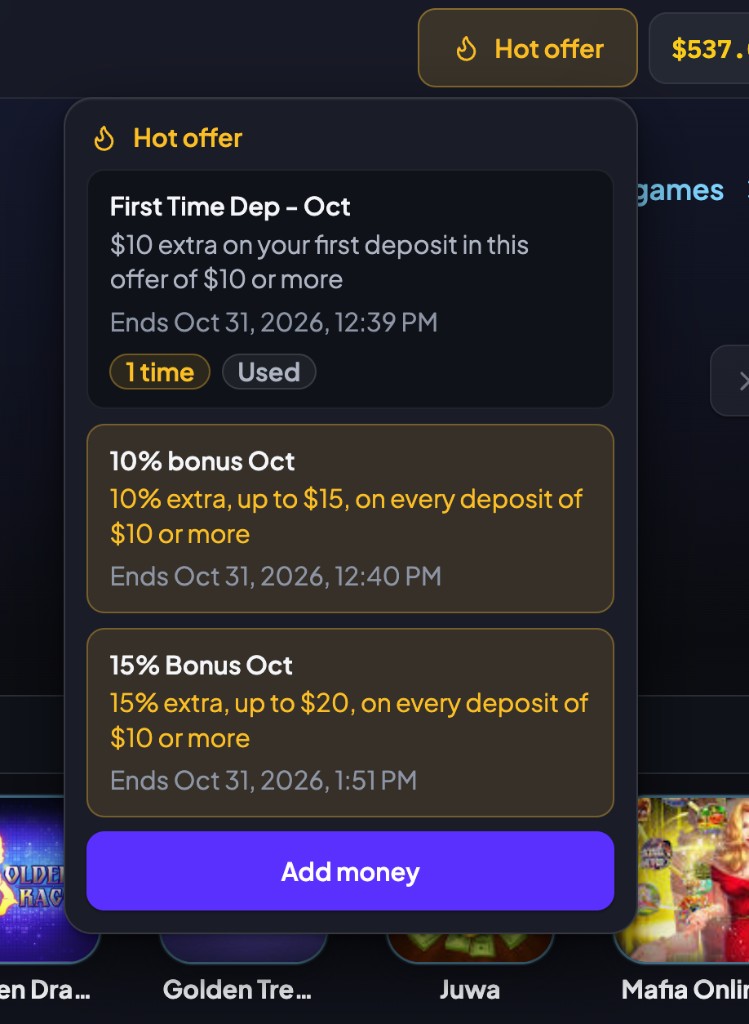
Each card has three parts:
| What you see | What it means |
|---|---|
| The bold title | The name the shop or Admin wrote in What the player sees. |
| The gold line | The rule, built from the offer. A percent offer includes the most one deposit can earn, and whether it is every deposit or the first deposit in that offer. |
| Ends … | The moment the offer stops. The clock is the clock on your device. |
A first-deposit offer is marked 1 time. After you have used that one chance, the card stays in the list and reads Used. It does not pay again.
The first time offers are available, a reminder opens. Don't show this again hides that reminder. Add money opens the deposit screen. The Hot offer chip stays either way.
Checkout
On checkout, Bonus is one total. Each offer sits under it, without its own plus sign, so the lines are parts of that total and not extra bonuses on top. You receive is the deposit plus the bonus.
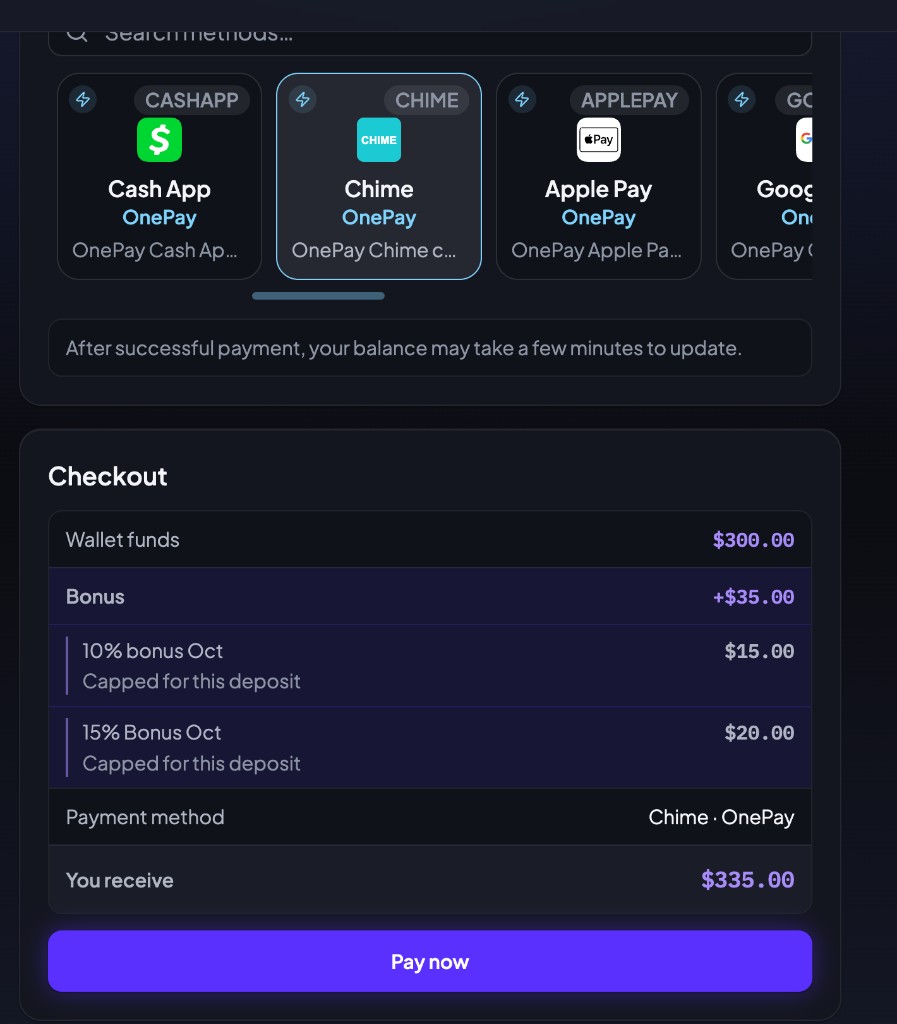
In the example, wallet funds are $300.00. The 10% offer pays $15.00 and the 15% offer pays $20.00, so Bonus is +$35.00. You receive $335.00. A line that says Capped for this deposit has reached the most that one deposit can earn from that offer.
A deposit under the minimum for an offer, $10.00 unless the campaign sets a higher floor, does not get that offer. It also does not use up a one-time offer.
The bonus is added when the deposit succeeds. You do not press a claim button. If the shop, or the platform, does not have enough credit for the deposit and the bonus together, the deposit does not open. The screen asks you to contact the shop or an admin.
History
The deposit and the bonus are two lines.
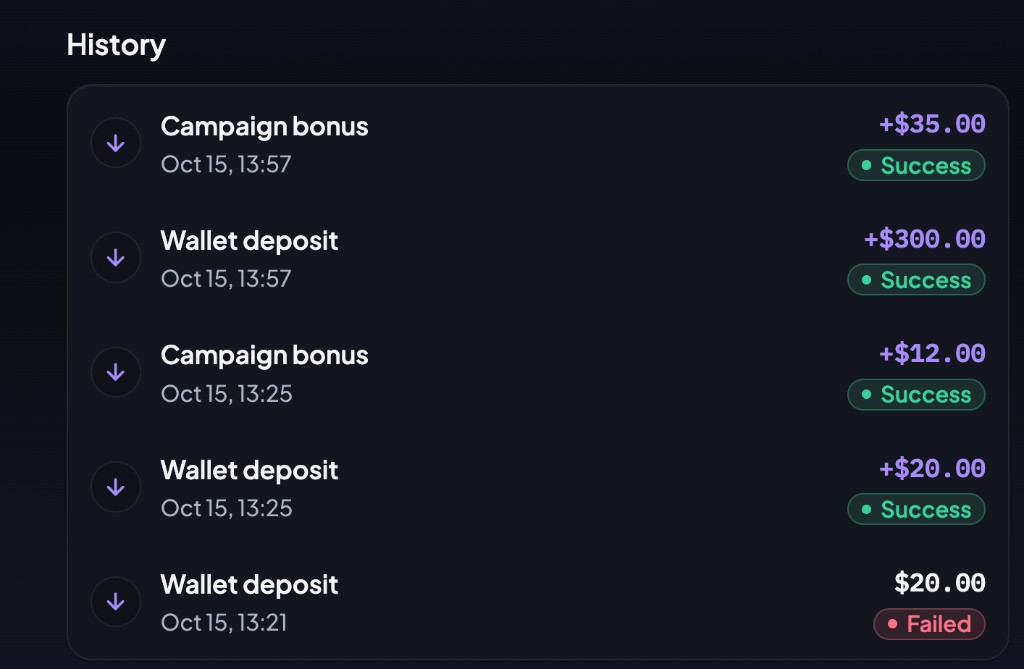
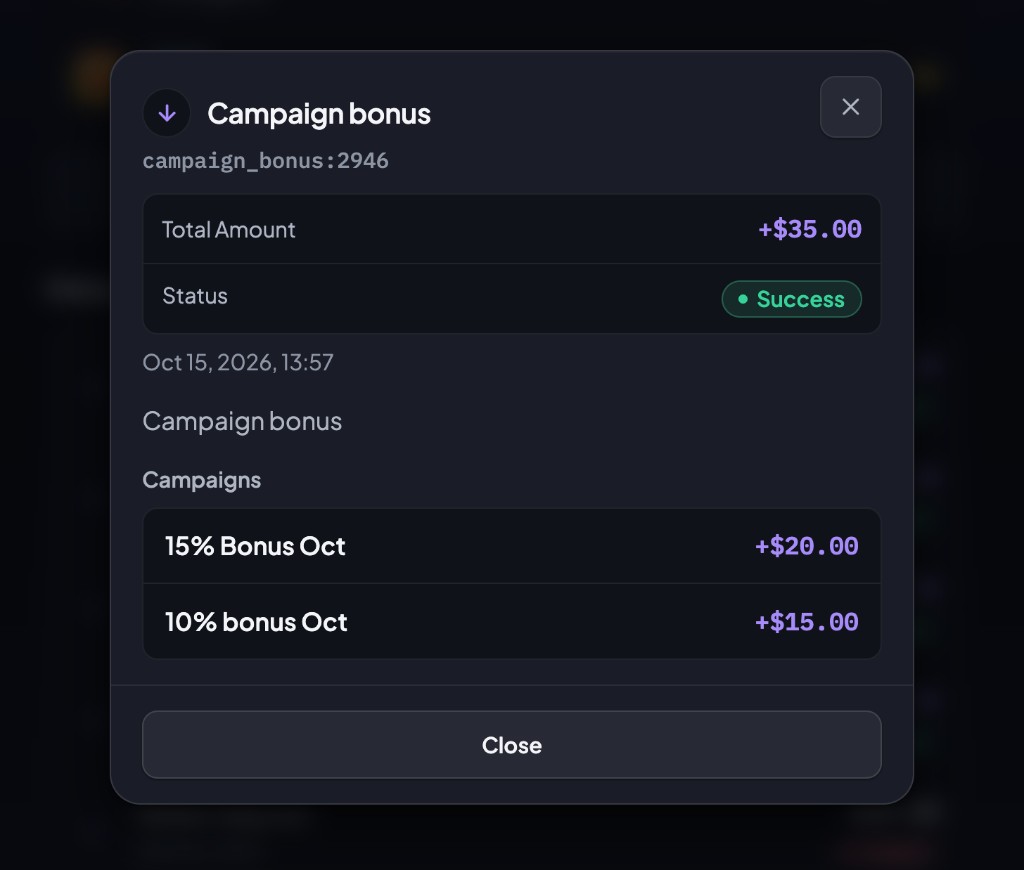
Open the Campaign bonus line to see which offers made that total.
Cash out
Play bonus already in the account stays in, so you can keep playing. Cash out shows the split on Where is the money coming from?
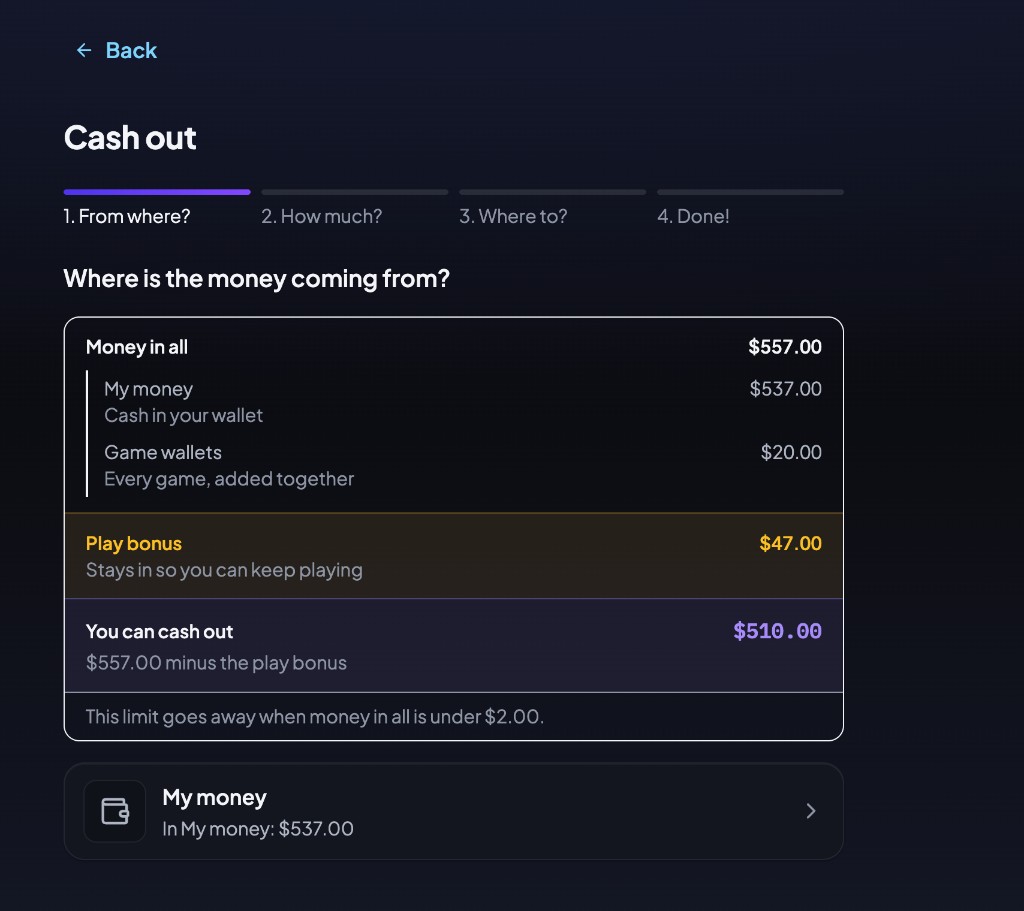
| Line | Meaning |
|---|---|
| Money in all | My money plus every game wallet, added together. |
| My money | Cash in your wallet. |
| Game wallets | Every game, added together. |
| Play bonus | The extra that stays in. |
| You can cash out | Money in all minus the play bonus. This is the amount that can leave My money. |
In the example, money in all is $557.00, made of $537.00 in My money and $20.00 in game wallets. Play bonus is $47.00, so $510.00 can be cashed out.
The limit goes away when money in all is under $2.00. From $2.00 upward, the play bonus stays. Ending a campaign, or letting it expire, stops new bonuses. It does not remove a bonus you already received.
You can still move money from a game back to My money. If the play bonus is the whole balance, My money says nothing can be cashed out yet, and the games stay open.
Shop owners
Where: Shop → Settings → Deposit bonus campaign.
The list
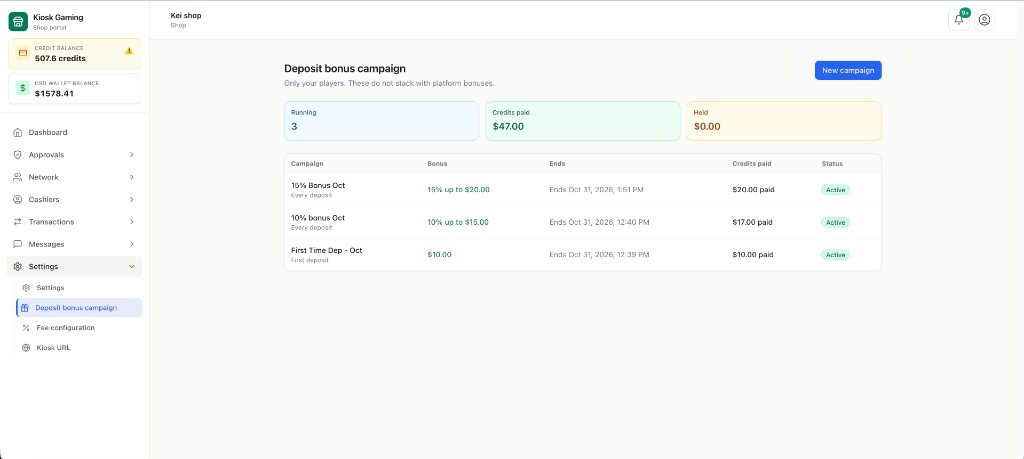
The line under the title says these offers are only for your players, and they do not stack with platform bonuses.
| Card | What it counts |
|---|---|
| Running | Campaigns whose status is Active. |
| Credits paid | Bonus already given to players, added across those running campaigns. |
| Held | Bonus set aside for a deposit that is open and not finished yet. If that deposit is not paid, the hold goes back. |
Click a row to open it. New campaign opens a blank offer.
Create a campaign
The form has three groups.
What the player sees
| Field | What to put |
|---|---|
| Name | The name on your list. Players do not need this to match the card title. |
| What the player sees | The bold title on Hot offer and on checkout. |
The gold sentence under that title is written for you from the offer. You do not type it.
The offer
| Field | What it does |
|---|---|
| Applies to | Every deposit, or First deposit in this campaign. First deposit means the player's first deposit while this campaign is running. A player who deposited last month can still receive it once. |
| Bonus | Percentage of the deposit, or Fixed amount. For a percent, 10 means 10% of the deposit. |
| Minimum deposit ($) | Deposits under this amount do not get the bonus. The floor is $10.00. A deposit under the minimum does not use up a one-time offer. |
| Most one deposit can earn ($) | The cap for a percent offer on one deposit. A fixed offer pays its amount. |
Two First deposit in this campaign offers for your shop cannot cover the same hours, including while one of them is Draft or Paused. An Ended campaign no longer blocks the next one. The next one may start at the exact minute the previous one ends.
When
| Field | What it does |
|---|---|
| Starts and Ends | The offer pays on deposits from the start up to, and not including, the end. |
| Status | Draft is saved and does not pay. Active pays. Paused keeps the dates and stops new bonuses. Ended stops new bonuses. A payment that was already opened still pays the amount the player was shown. |
Press Save. A new Active campaign starts paying on the next deposit that qualifies.
After the campaign has run
Once a campaign is Active, Paused, or Ended, or once any bonus has been paid or held, the offer itself is locked. Applies to, the bonus type, the percent or amount, the minimum, and the per-deposit cap stay as they were. The note on the page says: to change the bonus, end this campaign and create a new one.
You can still change the name, what the player sees, and the end time. You can extend the end or end it early. You can set the status to Active, Paused, or Ended. You cannot put it back to Draft. Starts can be changed only before the start time has passed.
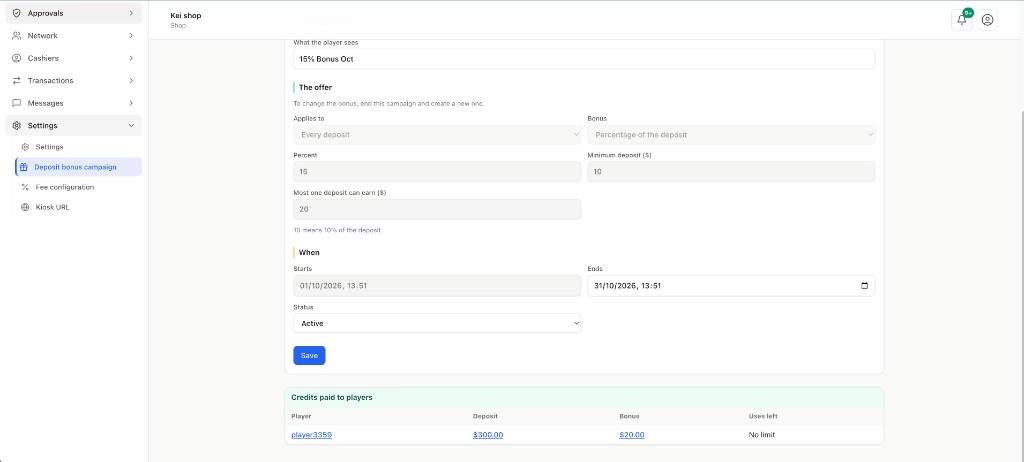
Bonuses already paid, and a deposit that is still open, keep the amount from the moment they were quoted. They do not follow a later edit.
Credits paid to players
On the campaign, Credits paid to players lists each bonus that was paid.
| Column | Where it goes |
|---|---|
| Player | That player's page. |
| Deposit | The shop USD wallet line for that deposit, when there is one. A counter deposit can have no USD line. The amount then stays as text. |
| Bonus | The credit transaction that paid the bonus. |
| Uses left | How many more times that player can receive this campaign. No limit means every qualifying deposit can receive it. A first-deposit campaign is one time. |
Credit in the shop wallet
The shop credit wallet pays both the deposit and the bonus. If the wallet cannot cover both, the player's deposit does not open. Check the credit balance before you turn a campaign Active, and again while it is running. Held is credit already reserved for a deposit that has not finished.
Admin and operations
Where: Admin → Platform configuration → Deposit bonus campaign.
This page is for platform players. It does not pay players who belong to a shop. The line under the title says only platform players, and these do not stack with shop bonuses.
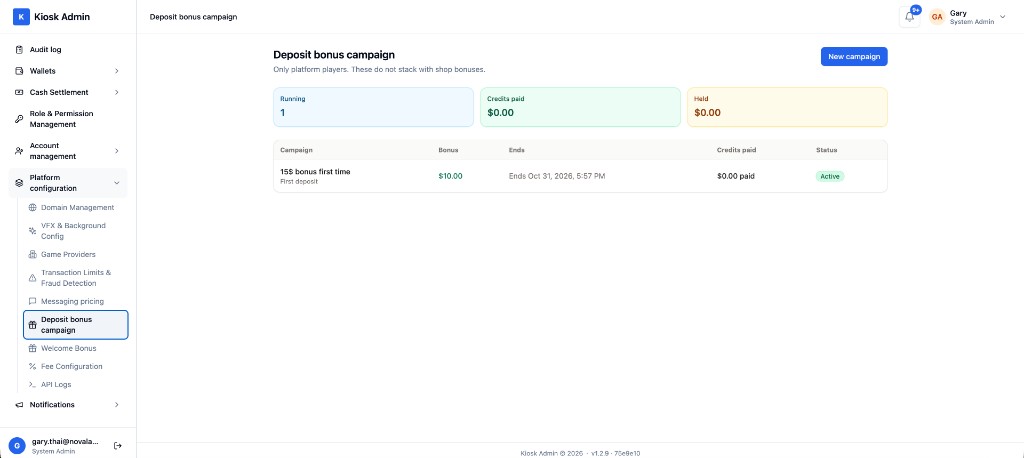
New campaign opens the same form the shop uses. Saving does not change a bonus a player has already received.
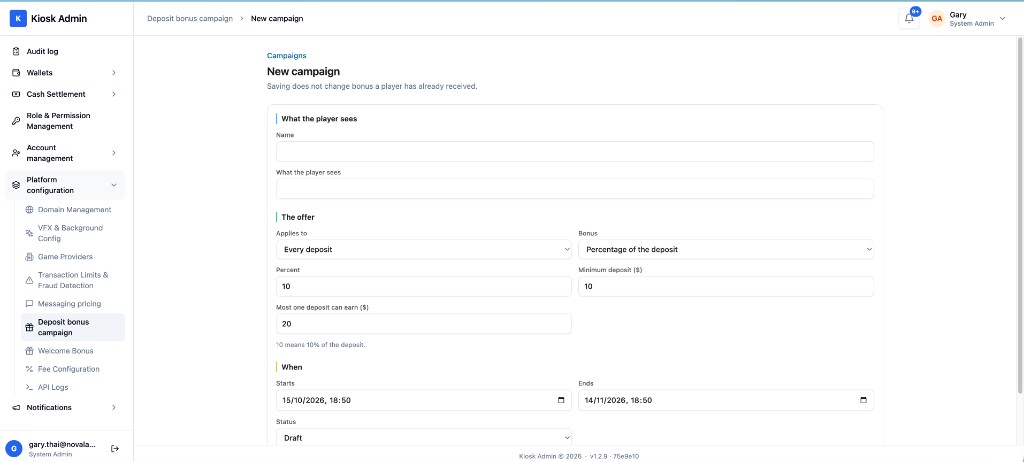
The campaign screen works the same way as the shop. The offer locks after the campaign has run. Ending it and creating a new one is how you change the bonus.
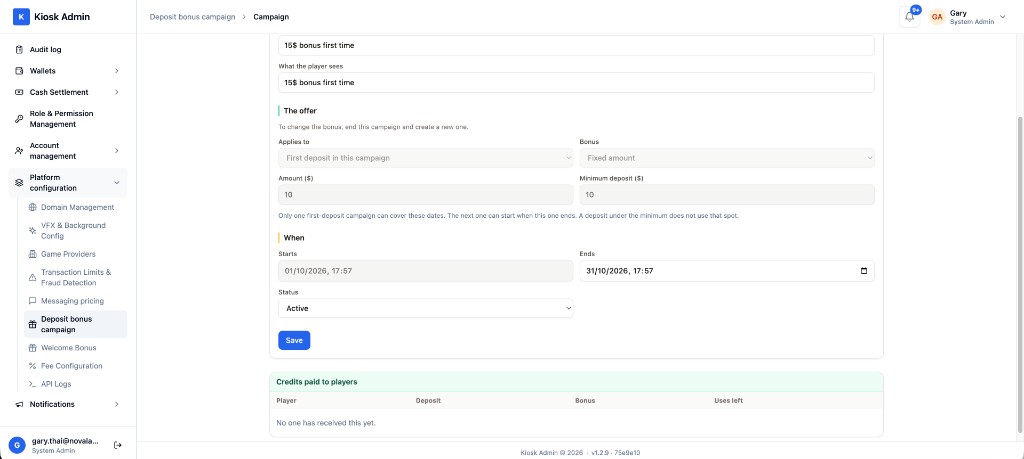
On Credits paid to players, the player name opens that user, and the deposit amount opens the payment. The bonus amount is shown as a number.
Anyone who can open Platform configuration can read the page. New campaign and Save are for System Admin, Super Admin, and Finance Admin.
A platform campaign also needs platform credit for the deposit plus the bonus. If that credit is short, the platform player's deposit does not open.
Operations can use the same rules as a shop: Draft while you prepare it, Active when it should pay, Paused to stop new bonuses without throwing away the dates, Ended when it is over. A deposit that already opened still pays the bonus the player was shown, even after the end time.
What did not change
Welcome Bonus is unchanged. Cash out from a game back to My money is unchanged. The new limit applies when money leaves My money to the outside.